Discord has become an essential platform for millions of users worldwide, serving gamers, professionals, and community members who rely on seamless voice communication. However, nothing disrupts the flow of conversation quite like unexpected voice chat disconnections. According to TechedKnow, understanding the root causes of these interruptions is the first step toward achieving stable, reliable voice communication on Discord.
Voice chat disconnections can range from momentary hiccups to complete communication breakdowns. These issues affect productivity during work meetings, ruin gaming experiences, and create frustration during casual conversations with friends. Whether you experience frequent drops or occasional interruptions, identifying the underlying causes helps you implement targeted solutions. Moreover, recognizing patterns in your disconnection issues allows you to troubleshoot more effectively and prevent future problems.
When users notice their discord voice is down, the problem often stems from multiple potential sources rather than a single identifiable cause. These sources typically fall into several categories, including network problems, software conflicts, hardware limitations, and server-side issues. Understanding each category empowers users to diagnose their specific situation accurately. Additionally, knowing the difference between client-side and server-side problems saves valuable troubleshooting time.
Network Connectivity Issues
Network problems represent the most common cause of Discord voice chat disconnections. Your internet connection serves as the foundation for all Discord communications, and any instability directly impacts voice quality and reliability. Furthermore, network issues manifest in various ways, from complete disconnections to degraded audio quality that makes conversations difficult.
Insufficient bandwidth creates significant challenges for Discord voice chat. When multiple devices share your network connection, they compete for available bandwidth. Streaming services, downloads, and online games consume substantial bandwidth resources. Therefore, Discord may struggle to maintain a stable voice connection when bandwidth becomes limited. This competition intensifies during peak usage hours when household internet demand reaches its highest levels.
Network congestion affects Discord performance differently than simple bandwidth limitations. Even with adequate overall bandwidth, congestion at your internet service provider level can cause packet loss and increased latency. These problems result in choppy audio, delayed responses, and sudden disconnections. Additionally, outdated router firmware often contributes to congestion problems by inefficiently managing network traffic.
Wi-Fi signal strength and stability play crucial roles in maintaining Discord voice connections. Weak signals or interference from other wireless devices create unstable connections that drop frequently. Physical obstacles like walls, floors, and large appliances weaken Wi-Fi signals. Meanwhile, neighboring networks operating on the same channel cause interference that degrades connection quality. Users positioned far from their routers or in areas with poor signal coverage experience more frequent disconnections.
Server-Side Problems
Discord operates through a vast network of servers distributed globally. Occasionally, these servers experience technical difficulties that affect voice chat functionality. Server outages, maintenance periods, and unexpected technical issues can cause widespread disconnections affecting numerous users simultaneously. However, these problems typically resolve relatively quickly as Discord’s technical team addresses them.
Regional server issues sometimes affect specific geographic areas while leaving other regions unaffected. Discord automatically connects users to the nearest server for optimal performance, but regional servers may experience localized problems. Server overload during peak usage times can strain resources and cause performance degradation. Additionally, specific voice channels or servers may experience problems while the broader Discord network functions normally.
Users can check Discord’s status page to determine whether server-side issues are causing their disconnections. This official resource provides real-time information about ongoing incidents and scheduled maintenance. Consulting this page before extensive troubleshooting saves time and frustration when the problem lies beyond user control.
Software Conflicts and Compatibility Issues
Various software conflicts interfere with Discord’s ability to maintain stable voice connections. Background applications, security software, and operating system updates can all create compatibility problems. These conflicts often develop after installing new programs or updating existing software, making them particularly challenging to identify.
Antivirus and firewall programs sometimes block Discord’s network connections, interpreting legitimate traffic as potential threats. These security measures, while important for system protection, can inadvertently disrupt voice chat functionality. Overly aggressive security settings create false positives that interrupt Discord’s communication protocols. Therefore, configuring security software to allow Discord requires careful attention to maintain both protection and functionality.
VPN services introduce another layer of potential conflicts. While VPNs provide privacy and security benefits, they can increase latency and create routing problems that affect Discord voice chat. Some VPN servers struggle to handle real-time communication traffic efficiently. Moreover, certain VPN configurations conflict with Discord’s connection requirements, resulting in frequent disconnections.
Outdated Discord applications lack the latest bug fixes and compatibility improvements. Developers continuously release updates addressing known issues and enhancing performance. Running outdated versions increases the likelihood of encountering problems that newer versions have already resolved. Similarly, outdated audio drivers create compatibility issues between Discord and your system’s audio hardware.
Hardware Limitations
Physical hardware components directly impact Discord voice chat stability. Insufficient system resources prevent Discord from functioning optimally, particularly during resource-intensive activities. When your computer struggles to manage multiple demanding tasks simultaneously, Discord performance suffers accordingly.
RAM limitations force your system to prioritize applications, sometimes at Discord’s expense. Insufficient memory causes applications to compete for resources, resulting in performance degradation across all running programs. Discord requires adequate RAM to process voice data efficiently and maintain stable connections. Additionally, systems with minimal available RAM experience more frequent crashes and disconnections.
CPU bottlenecks occur when your processor cannot handle the combined demands of Discord and other running applications. Modern processors typically manage Discord efficiently, but older or lower-powered CPUs may struggle. Resource-intensive games, video editing software, and multiple browser tabs consume CPU cycles that Discord needs for voice processing. Consequently, users with older hardware configurations face more frequent voice chat problems.
Audio device problems create disconnection issues distinct from network or software causes. Faulty microphones, headsets, or audio interfaces generate errors that Discord interprets as connection problems. Loose connections, damaged cables, and malfunctioning USB ports all contribute to apparent disconnections. Furthermore, incompatible audio devices may work intermittently, creating frustrating and unpredictable disconnection patterns.
Discord Settings Configuration
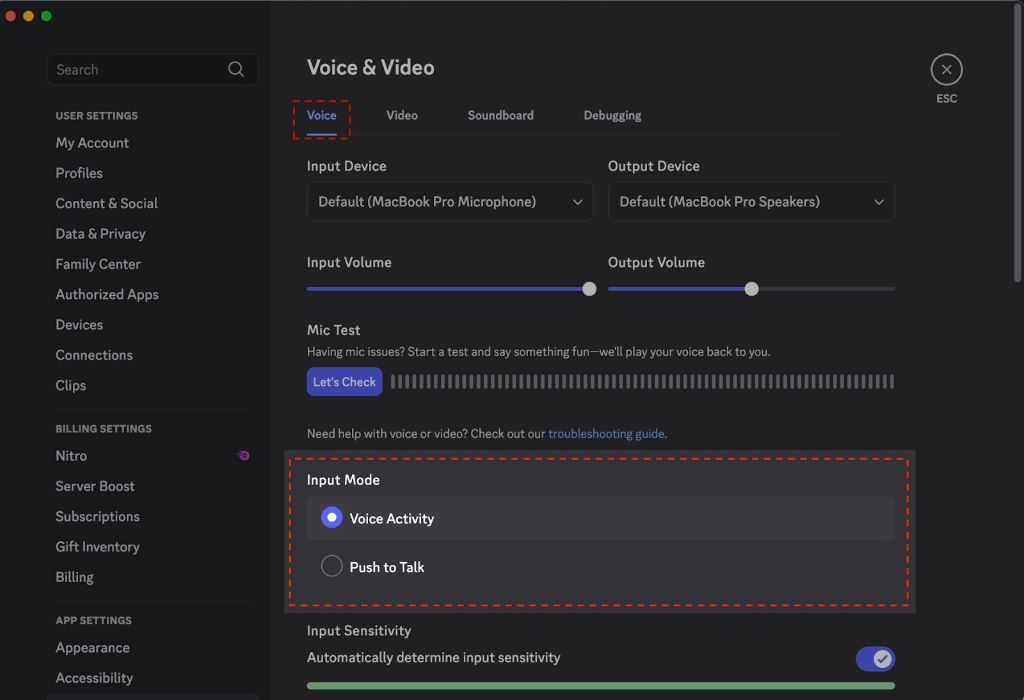
Incorrect Discord settings often contribute to voice chat disconnections. The application offers numerous configuration options that, when set improperly, interfere with stable connections. Voice and video settings particularly impact connection reliability, and small misconfigurations create significant problems.
Voice activity detection settings sometimes trigger disconnections when configured too sensitively. These settings determine when Discord transmits your voice, and incorrect sensitivity levels cause the application to cut off unexpectedly. Too sensitive settings pick up background noise and create transmission conflicts. Conversely, insufficiently sensitive settings fail to detect speech properly, creating apparent disconnection issues.
Quality of service settings affect how Discord prioritizes network traffic. High priority settings help maintain voice connections during network congestion, but incorrect QoS configuration can conflict with router settings. Some network environments require specific QoS settings to function properly with Discord. Additionally, certain ISPs throttle traffic based on QoS markers, potentially affecting Discord performance.
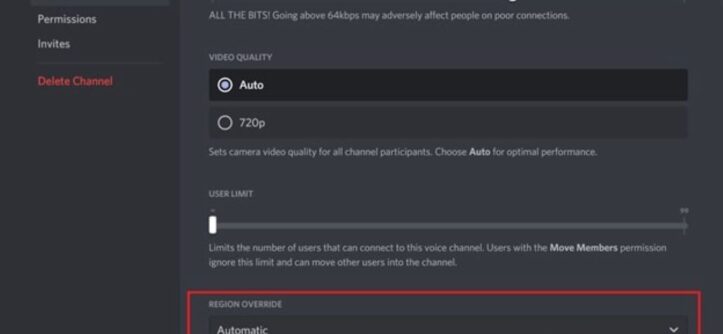
Server region selection significantly impacts connection stability. Discord automatically selects servers based on proximity, but manual region selection sometimes provides better results. Users experiencing frequent disconnections may benefit from testing different server regions. According to Discord’s official documentation, selecting a server region with lower latency often improves overall voice chat stability.
Operating System and Platform Differences
Different operating systems handle Discord voice connections with varying efficiency. Windows, macOS, Linux, and mobile platforms each present unique challenges and advantages. Understanding platform-specific issues helps users troubleshoot more effectively and implement appropriate solutions.
Windows systems commonly experience conflicts with audio enhancements and exclusive mode settings. These features, designed to improve audio quality, sometimes interfere with Discord’s audio processing. Windows updates occasionally reset audio settings, requiring users to reconfigure Discord after system updates. Additionally, Windows Defender and built-in firewall settings may block Discord connections after updates.
macOS users face different challenges, including permission issues and conflicts with system audio management. Apple’s privacy features require explicit permissions for Discord to access microphones and establish network connections. Recent macOS versions introduced stricter security measures that sometimes flag Discord’s network activity. Furthermore, conflicts with other audio applications occur more frequently on macOS due to CoreAudio architecture limitations.
Mobile platforms introduce cellular network variables that affect Discord stability. Mobile data connections experience more fluctuation than wired or Wi-Fi connections, causing frequent voice chat interruptions. Battery optimization features on mobile devices sometimes throttle Discord’s background activity to conserve power. These optimizations, while beneficial for battery life, create disconnection problems during voice chats.
Background Application Interference
Numerous background applications compete with Discord for system resources and network bandwidth. These applications, often running without user awareness, consume resources that Discord needs for stable voice communication. Identifying and managing background processes represents an important troubleshooting step.
Automatic update services download large files in the background, consuming bandwidth and processing power. Operating system updates, game clients, and cloud backup services all trigger downloads that interfere with Discord. These downloads create network congestion and increase latency, resulting in voice chat disconnections. Moreover, updates sometimes restart services that Discord depends on, causing temporary interruptions.
Game overlays and recording software frequently conflict with Discord’s overlay features. Multiple overlay applications compete for system hooks and screen capture resources. These conflicts create instability that manifests as voice disconnections and application crashes. Streaming software, particularly when using hardware encoding, places heavy demands on system resources that affect Discord performance.
Browser applications with numerous open tabs consume surprising amounts of RAM and CPU resources. Video streaming, social media feeds, and complex web applications run continuously in background tabs. These processes create resource contention that degrades Discord performance. Additionally, browser-based communication tools may conflict with Discord’s network connections when running simultaneously.
Conclusion
Discord voice chat disconnections stem from various sources, including network problems, server issues, software conflicts, hardware limitations, and configuration errors. Understanding these causes enables users to implement targeted solutions and maintain stable voice connections. Network connectivity remains the most common culprit, requiring attention to bandwidth, signal strength, and ISP performance. However, software conflicts and hardware limitations also play significant roles in connection stability.
Successfully troubleshooting Discord disconnections requires systematic investigation of each potential cause. Users should first verify their network connection quality and check Discord’s server status. Subsequently, examining software conflicts, updating applications, and optimizing system resources often resolves persistent issues. Finally, proper Discord configuration and awareness of platform-specific challenges complete a comprehensive approach to maintaining reliable voice chat.
Frequently Asked Questions
Why does my Discord voice chat keep disconnecting randomly?
Random disconnections typically result from unstable network connections, insufficient bandwidth, or background applications consuming resources. Additionally, outdated Discord versions and improper server region settings contribute to random disconnection patterns. Checking your internet stability and updating Discord often resolves these issues.
How do I know if Discord servers are causing my disconnection problems?
Visit Discord’s official status page to check for server outages or maintenance affecting your region. If the status page shows active incidents matching your symptoms, the problem lies with Discord’s infrastructure rather than your local setup. Server-side issues typically resolve without user intervention within a few hours.
Can my antivirus software cause Discord voice disconnections?
Yes, antivirus and firewall programs sometimes block Discord’s network traffic, interpreting it as suspicious activity. These security measures can prevent Discord from maintaining stable voice connections. Adding Discord to your antivirus whitelist or creating firewall exceptions usually resolves these conflicts while maintaining system security.
Does using a VPN affect Discord voice chat stability?
VPNs can impact Discord voice chat by increasing latency and routing traffic through distant servers. Some VPN configurations conflict with Discord’s connection protocols, causing frequent disconnections. If you must use a VPN, selecting servers geographically close to Discord’s servers minimizes performance impact.
Why does Discord disconnect only during gaming sessions?
Games consume significant system resources, including CPU, RAM, and network bandwidth. This resource competition forces your system to prioritize between Discord and the game, sometimes degrading Discord performance. Additionally, game overlays and anti-cheat software may conflict with Discord, creating disconnections during gameplay.
Related Topics:
Unlocking the Power of HDMI Splitter Diagram: A Comprehensive Guide
Talkpal Review: Is This AI Chatbot Worth Your Time?