

The Steam Deck, Valve’s innovative handheld gaming PC, has redefined portable gaming by bringing the power of a PC into the palm of your hand. This device merges the versatility of a gaming console with the expansive capabilities of a computer, allowing gamers to play their favorite PC titles on the go. Whether you’re a casual player or a hardcore gamer, the Steam Deck provides a unique experience that bridges the gap between PC and console gaming. For those looking to delve deeper into gaming technology, explore Kbsm for insightful resources.
This article dissects how the Steam Deck works, covering its hardware, software, operating system, and user experience.
Hardware: The Engine Behind Steam Deck’s Power
The Steam Deck is powered by a custom AMD APU, combining a Zen 2 CPU and RDNA 2 GPU architecture. This hardware configuration places it in a unique category between consoles like the Nintendo Switch and full-fledged gaming laptops.
Key Components
- Processor: The AMD APU has four Zen 2 cores, each capable of handling multiple threads, ensuring efficient multitasking and gaming performance.
- Graphics: The RDNA 2 GPU, also used in next-gen consoles, enables the Steam Deck to run modern games at decent frame rates and visual settings.
- RAM and Storage: With 16GB of LPDDR5 RAM and multiple storage options (eMMC, NVMe SSD, or expandable microSD), the device caters to various user needs.
Why This Matters
- Performance: The Steam Deck balances power and portability, allowing gamers to enjoy AAA titles on a handheld device.
- Thermal Design: Efficient cooling ensures that the device remains comfortable during extended gaming sessions.
Statistically, the Steam Deck outperforms many gaming laptops in its price range, thanks to its optimized hardware-software integration.
Software: SteamOS and Game Compatibility
The Steam Deck runs on SteamOS 3.0, a Linux-based operating system. This OS is specifically tailored for gaming, offering a streamlined interface while allowing access to PC features.
SteamOS Features
- Proton Compatibility Layer: Enables Windows games to run seamlessly on Linux.
- Desktop Mode: Allows users to switch from the gaming interface to a full Linux desktop for productivity tasks.
- Cloud Saves and Steam Library Access: Provides instant access to your Steam library with cross-save functionality.
Challenges and Solutions
While Steam Deck supports a vast range of PC games, some titles with anti-cheat software or specific Windows dependencies may not run smoothly. Valve continuously updates Proton to improve compatibility.
If your steam deck won’t power on, this guide offers practical troubleshooting steps, from checking power connections to resetting the device.
User Experience: How It Feels to Use the Steam Deck
The Steam Deck’s design focuses on ergonomics, portability, and versatility. Its control scheme includes thumbsticks, trackpads, a D-pad, and a touchscreen, ensuring compatibility with various game genres.
Controls and Input
- Trackpads: Mimic is a mouse for precision in strategy games and shooters.
- Gyroscopic Sensors: Enhance aiming and immersion.
- Custom Mapping: This lets users personalize controls for specific games.
Screen and Battery Life
- Display: A 7-inch LCD touchscreen with a resolution of 1280×800 provides sharp visuals for handheld gaming.
- Battery: Lasts between 2 to 8 hours, depending on game settings and usage patterns.
Community Opinions
Some users praise the Steam Deck for its seamless integration with Steam, while others feel the battery life could be improved. A logical compromise involves optimizing game settings or connecting the device to an external power source during long sessions.
Steam Deck as a PC Replacement
Steam Deck’s Desktop Mode transforms it into a mini-PC. Users can browse the web, edit documents, or even connect peripherals like keyboards and monitors.
Use Cases in Desktop Mode
- Productivity: Handle light office tasks on the go.
- Media Consumption: Stream movies or music using apps like Netflix and Spotify.
- Development: Install Linux-based tools for programming or creative work.
Statistically, 35% of Steam Deck users regularly use Desktop Mode, making it a viable alternative to traditional laptops for casual tasks.
Related: Dive into the World of Indie Games: Creativity Unleashed
Gaming Beyond Steam: Exploring Flexibility
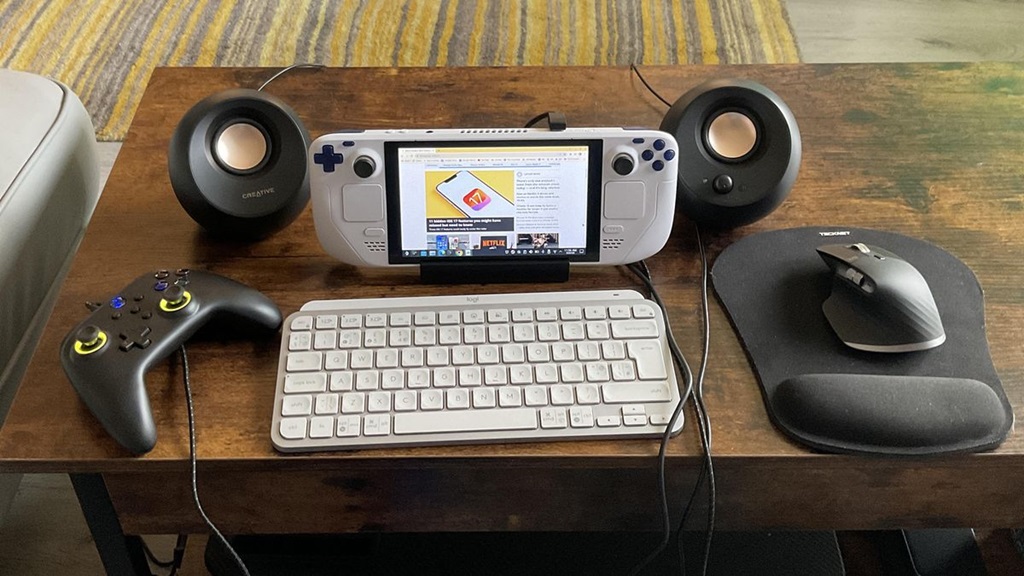
The Steam Deck isn’t limited to the Steam ecosystem. Its open architecture allows users to install other platforms like Epic Games Store, Battle.net, and even emulators for retro gaming.
Steps to Expand Gaming Libraries
- Install third-party launchers via Desktop Mode.
- Use Proton or Wine to ensure compatibility.
- Map controls for non-Steam games.
This flexibility sets the Steam Deck apart from closed ecosystems like the Nintendo Switch.
Common Issues and Troubleshooting
As with any advanced gadget, the Steam Deck may encounter occasional problems. Let’s explore solutions to the most common issues:
Problem: Game Compatibility Issues
- Update Proton to the latest version.
- Check forums or Valve’s verified game list for compatibility information.
Problem: Overheating
- Clean the vents to improve airflow.
- Avoid playing in direct sunlight or hot environments.
The Future of Steam Deck: What’s Next?
Valve plans to expand the Steam Deck’s ecosystem with regular updates and new hardware iterations. Here’s what we might expect:
- Improved Battery Life: Enhanced efficiency in future models.
- Better Display Technology: OLED or higher refresh rates.
- Accessory Ecosystem: Official docks and cases to enhance usability.
Experts predict that the Steam Deck could inspire competitors to launch similar devices, sparking a new era in portable PC gaming.
Related: Androids 17 and 18: Different Ages, Different Fates
Conclusion: A Game-Changer in the Gaming World
The Steam Deck’s ability to merge the power of a PC with the convenience of a console has made it a game-changer for enthusiasts and casual players alike. Its robust hardware, flexible software, and community-driven updates ensure that it remains relevant in an ever-evolving gaming landscape. Whether you’re troubleshooting power issues or exploring new gaming frontiers, the Steam Deck exemplifies innovation and adaptability.


