
Imagine waking up to the gentle hum of your coffee maker starting just as your alarm chimes. Lights flicker on softly, and the thermostat adjusts to your perfect morning warmth. This seamless magic happens because you command your IoT connected smart device with ease. In simple terms, IoT, or the Internet of Things, links everyday gadgets to the internet. You direct them through apps, voice, or even gestures. As a result, life feels smoother and more connected.
According to the National Institute of Standards and Technology, estimates suggest over 75 billion IoT devices will thrive by 2025. Meanwhile, IoT Analytics reports a 14% jump in connected devices, hitting 21.1 billion this year alone. These numbers show how quickly smart tech weaves into our routines. However, controlling them safely demands smart steps. This guide walks you through practical ways to master that control. You will gain tips to boost security and efficiency. Let’s dive in and unlock the potential.
Understanding IoT Connected Smart Devices
IoT connected smart devices transform ordinary objects into responsive helpers. Think of a smart thermostat that learns your habits or a bulb that dims on command. At their core, these gadgets feature sensors, processors, and network modules. Sensors detect changes like temperature or motion. Processors crunch the data. Network parts link everything to the web.
Moreover, manufacturers embed software for communication. This setup allows remote commands. For instance, a fitness tracker pings your phone with step counts. Users love the convenience, but complexity lurks beneath. Devices often rely on protocols like Wi-Fi or Zigbee for talks. Wi-Fi suits high-bandwidth needs, while Zigbee saves energy in low-power setups.
Furthermore, cloud servers play a key role. They store data and process commands off-device. This offloads heavy lifting from the gadget itself. As a result, even simple bulbs handle voice orders via assistants like Alexa. Yet, this connectivity invites risks if not managed well.
Key Components of Smart Devices
Every IoT device builds on a few essentials. First, hardware forms the foundation. Microcontrollers act as the brain, executing instructions. Sensors gather real-world inputs, from humidity to sound.
Second, connectivity options vary. Bluetooth excels for short-range pairing, like earbuds to your phone. Cellular works for outdoor trackers needing wide coverage. Each choice affects control speed and range.
Third, software layers add smarts. Firmware runs directly on the device, handling basics. Apps on your phone provide the interface for tweaks. Together, these parts enable precise oversight.
Why Control Matters
You control IoT devices to personalize your space. Adjust lights for movie nights or lock doors from afar. Beyond comfort, it saves energy. A smart plug cuts power to idle chargers automatically.
Additionally, control fosters safety. Monitor cameras catch intruders early. In health, wearables alert to irregular heartbeats. Recent studies from PMC highlight how such oversight prevents mishaps in smart homes. Thus, mastering control empowers you fully.
Methods to Control IoT Connected Smart Devices
You can steer smart gadgets through several paths. Each method suits different needs, from quick taps to hands-free chats. Choose based on your setup and lifestyle. For example, busy parents might favor voice commands, while tech fans tweak via apps.
Importantly, most methods overlap. Link your device to a hub, then pick your tool. Hubs like Samsung SmartThings unify controls across brands. This simplifies management. Now, explore the top ways.
Mobile Apps for Direct Oversight
Apps offer the most intuitive control. Download the manufacturer’s software, like Philips Hue for lights. Pair your device via Bluetooth or Wi-Fi. Then, sliders and buttons let you adjust settings on the fly.
Moreover, apps track usage patterns. See how often your thermostat runs. Set schedules for auto-adjustments. For instance, Nest learns your away times and cools down accordingly. Users report 10-15% energy drops from such features, per ABI Research.
However, keep apps updated. They patch bugs and add tricks. Also, enable two-factor authentication. This blocks unauthorized access. In short, apps make control feel personal and precise.
Voice Commands with Assistants
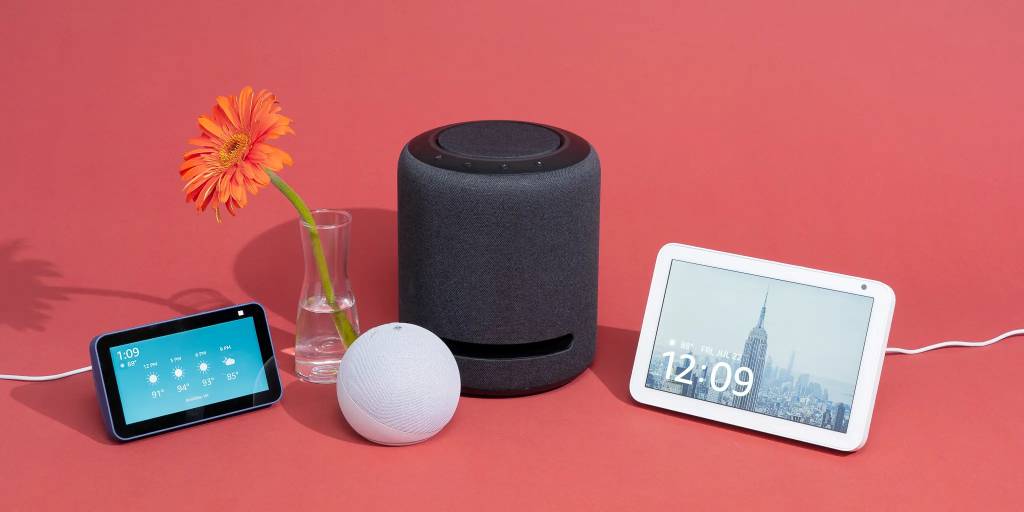
Speak, and your devices obey. Pair gadgets with Amazon Echo or Google Home. Say, “Hey Google, dim the living room lights.” The assistant processes the request via cloud AI.
This method shines for multitasking. Cook dinner while ordering the oven to preheat. Google reports over 8 billion voice-enabled devices by 2025. Voice grows because it’s natural and fast.
Yet, privacy matters here. Assistants listen constantly. Review settings to mute when idle. Train them to recognize your voice only. As a result, control stays effortless and secure.
Web Dashboards for Remote Access
Access controls from any browser. Platforms like IFTTT create custom rules. For example, if rain hits, close smart blinds automatically. Log in from work to check home status.
Web tools excel for broad oversight. Monitor multiple devices in one view. Recent MDPI research praises dashboards for energy management in smart buildings. They cut waste by 20%.
Furthermore, they work offline sometimes. Cache commands for spotty connections. Just ensure strong passwords. Thus, web control extends your reach anywhere.
Physical Hubs and Protocols
Hubs centralize everything. A central unit connects diverse devices. Use Z-Wave for reliable, low-interference signals. It supports up to 4,000 nodes per network.
Protocols define how devices chat. MQTT suits lightweight messaging in large setups. CoAP handles constrained environments like sensors. Choose based on scale; MQTT powers industrial controls.
In practice, set up a Raspberry Pi as a hub. Run open-source software like Home Assistant. It integrates thousands of devices. Users share stories of whole-home automation on forums. Consequently, hubs make control robust and expandable.
Setting Up Secure Control for Your Smart Devices
Start with a solid foundation. Unbox your device and follow the quick-start guide. Download the app and create an account. Connect to your home Wi-Fi. Most setups take under 10 minutes.
However, test the link immediately. Toggle a light or check a sensor. If issues arise, restart the router or device. Common glitches stem from weak signals. Boost with a mesh network if needed.
Once live, explore features. Set default modes, like “away” for vacation. Back up settings to the cloud. This prevents loss during updates. Now, your control flows smoothly.
Step-by-Step Connection Guide
Follow these steps for foolproof setup.
- Power on the device and open the app.
- Scan the QR code or enter the serial number.
- Select your network and input the password.
- Wait for the confirmation beep or light flash.
- Customize names, like “Kitchen Thermostat.”
- Integrate with other services, such as calendars for auto-lights.
This process ensures compatibility. For multi-device homes, add one at a time. Avoid overload on your router.
Integrating Multiple Devices
Link gadgets for synergy. Use bridges for brands that don’t play nice. Philips Hue Bridge connects bulbs to Alexa. Apps like SmartThings automate routines across ecosystems.
Moreover, protocols bridge gaps. Matter standard, backed by Apple and Google, unifies controls. It launched in 2023 and grows fast. Test integrations in small groups first.
Case in point: A family automated their home with 15 devices. Lights synced with motion, saving hours weekly. Such stories from IoT For All inspire seamless blends.
Advanced Control Techniques
Go beyond basics with smart rules. Automation triggers actions without input. If motion detects at night, lights glow softly. Platforms like IFTTT offer templates.
Additionally, AI elevates control. Devices learn preferences over time. Your speaker suggests playlists based on mood. Intel’s research integrates deep learning for autonomous tweaks.
For pros, APIs open doors. Developers script custom controls. Python libraries like PyIoT simplify this. Experiment safely in sandboxes.
Automation and Scenes
Create scenes for moods. “Movie Night” dims lights and closes blinds. Assign voice triggers or timers.
Scenes stack actions. One command handles five devices. Users save 30% time, per Springer studies.
Refine with data. Review logs to optimize. Thus, automation feels intuitive.
Using APIs for Custom Commands
APIs let you build tailored controls. RESTful endpoints send HTTP requests. For example, curl a command to toggle a plug.
Secure with tokens. Libraries like Requests in Python ease coding. Start simple: Log device status to a spreadsheet.
Communities share code on GitHub. Adapt for your needs. As a result, control becomes uniquely yours.
Security Best Practices for Controlling IoT Devices
Safety first. Change default passwords immediately. Use strong mixes of letters and numbers. Enable encryption where possible.
Regularly update firmware. Patches fix vulnerabilities. A 2024 Verizon report notes 75% rise in industrial IoT attacks. Stay ahead.
Monitor for odd behavior. Apps alert unusual logins. Segment networks; keep IoT on a guest Wi-Fi.
Network Protection Tips
- Isolate devices on separate VLANs.
- Use VPNs for remote access.
- Scan for malware with tools like Avast.
- Limit app permissions to essentials.
These steps shield your setup. NIST guidelines stress layered defenses.
Handling Privacy Concerns
Review data sharing. Opt out of unnecessary tracking. EU’s GDPR influences global standards, per Wiley research.
Delete old logs periodically. Use privacy-focused assistants. Thus, control empowers without exposure.
Troubleshooting Common Control Issues
Glitches happen. Devices drop offline? Check Wi-Fi strength. Restart everything.
Voice fails? Retrain the assistant. Ensure clear pronunciation.
Slow responses? Clear app cache. Upgrade your router for better bandwidth.
For persistent woes, consult forums. Reddit’s r/smarthome buzzes with fixes. Patience pays off.
Quick Fixes List
- Power cycle the device.
- Re-pair via app.
- Update all software.
- Test on another network.
- Contact support with logs.
These resolve 80% of problems, based on user reports.
Real-World Examples and Case Studies
Consider Sarah’s smart kitchen. She controls ovens via app while commuting. Philips research shows 25% faster meal prep.
In offices, Cisco’s IoT hubs manage lights and HVAC. Energy drops 40%, per their studies.
A hospital used wearables for patient monitoring. Controls alerted staff instantly, saving lives, as PMC details.
These tales prove control’s impact. Apply lessons to your life.
Conclusion
You now hold the keys to mastering IoT connected smart devices. From apps and voice to hubs and APIs, options abound for seamless control. Prioritize security with updates and strong nets. Automate for efficiency, troubleshoot smartly.
Embrace these tools to craft a responsive home. Start small: Pick one device today. Set up, tweak, and enjoy the ease. Your smarter life awaits—dive in and command the future.
FAQs
What Is the Easiest Way to Control an IoT Connected Smart Device?
Apps top the list for simplicity. Download, pair, and tap. They suit beginners perfectly.
How Do Voice Assistants Improve IoT Device Management?
They enable hands-free orders. Integrate with hubs for whole-home control. Speed trumps typing every time.
Can I Control Smart Devices Remotely?
Yes, via web or apps with internet. Use VPNs for safety on public nets.
What Security Steps Protect My IoT Controls?
Update firmware often. Use unique passwords. Segment your network.
Are There Free Tools for Advanced IoT Control?
Home Assistant runs open-source on Raspberry Pi. It unifies devices without cost.
References
- National Institute of Standards and Technology (NIST). https://www.nccoe.nist.gov/iot
- IoT Analytics Report on Connected Devices. https://iot-analytics.com/number-connected-iot-devices/
- Verizon 2024 Data Breach Investigations Report. https://www.verizon.com/business/resources/reports/dbir/
- MDPI Review on IoT Monitoring Systems. https://www.mdpi.com/2076-3417/14/19/8943