The Sony WH-1000XM5 headphones are one of the most advanced noise-canceling headphones on the market, offering superior audio performance and a customizable equalizer (EQ). However, to get the best sound experience, fine-tuning the EQ settings is essential. Whether you’re a bass lover, an audiophile craving balanced sound, or someone who enjoys crystal-clear vocals, finding the right EQ settings can enhance your listening experience significantly.
This guide will walk you through the best EQ settings for different music genres, optimal configurations for noise cancellation, and how to adjust your Sony WH-1000XM5 for the perfect sound.
Understanding the Sony WH-1000XM5 Equalizer
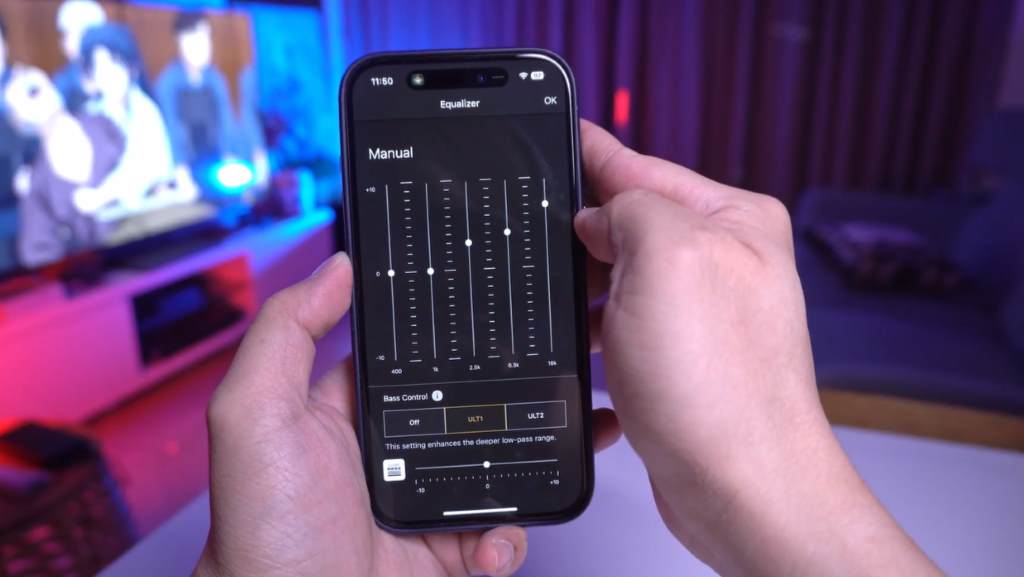
The Sony Headphones Connect app provides a 5-band equalizer with an additional Clear Bass adjustment. The bands are divided as follows:
- 400 Hz (Low Mids)
- 1 kHz (Mids)
- 2.5 kHz (Upper Mids)
- 6.3 kHz (Presence)
- 16 kHz (Brilliance)
- Clear Bass (Independent bass control)
Each frequency band affects the sound differently, and adjusting them properly on your steam deck can drastically change how your music sounds.
Best All-Round EQ Setting for Sony WH-1000XM5
For a balanced sound across all music genres, use these EQ settings:
| Frequency | Adjustment |
|---|---|
| Clear Bass | +2 |
| 400 Hz | -2 |
| 1 kHz | 0 |
| 2.5 kHz | +1 |
| 6.3 kHz | +3 |
| 16 kHz | +2 |
Why These Settings Work?
- Mildly reduced 400 Hz prevents muddiness in the lower mids.
- Slight boost at 2.5 kHz enhances vocal clarity.
- Increase in 6.3 kHz and 16 kHz makes the sound crisp and detailed without being harsh.
- Clear Bass at +2 adds a bit of depth without overwhelming the mix.
Best EQ Settings for Bass Lovers
If you love deep, punchy bass, these settings will deliver a more immersive experience:
| Frequency | Adjustment |
|---|---|
| Clear Bass | +6 |
| 400 Hz | -1 |
| 1 kHz | -2 |
| 2.5 kHz | 0 |
| 6.3 kHz | +2 |
| 16 kHz | +2 |
Why These Settings Work?
- Boosting Clear Bass to +6 enhances sub-bass without distorting mids.
- Slight reduction in 1 kHz and 400 Hz prevents muddiness.
- Higher frequencies are slightly increased to keep clarity in vocals and instruments.
Best EQ Settings for Vocals & Podcasts
For a clear and crisp vocal experience, use these settings:
| Frequency | Adjustment |
|---|---|
| Clear Bass | 0 |
| 400 Hz | -2 |
| 1 kHz | +3 |
| 2.5 kHz | +4 |
| 6.3 kHz | +3 |
| 16 kHz | +1 |
Why These Settings Work?
- Increased 1 kHz and 2.5 kHz boosts vocal clarity.
- Mild boost in 6.3 kHz and 16 kHz enhances sharpness without making it sibilant.
- Keeping Clear Bass at 0 ensures a natural and realistic voice tone.
Best EQ Settings for Classical & Acoustic Music
For those who enjoy instrumental clarity, these settings work best:
| Frequency | Adjustment |
|---|---|
| Clear Bass | +1 |
| 400 Hz | -1 |
| 1 kHz | +2 |
| 2.5 kHz | +3 |
| 6.3 kHz | +4 |
| 16 kHz | +3 |
Why These Settings Work?
- Moderate treble boosts at 6.3 kHz and 16 kHz enhance details in strings and pianos.
- Slight 1 kHz boost improves warmth in acoustic instruments.
- Balanced bass keeps sound natural without overpowering.
Best EQ Settings for Rock & Metal
Rock and metal lovers will appreciate these EQ settings:
| Frequency | Adjustment |
|---|---|
| Clear Bass | +3 |
| 400 Hz | -2 |
| 1 kHz | +1 |
| 2.5 kHz | +3 |
| 6.3 kHz | +5 |
| 16 kHz | +3 |
Why These Settings Work?
- Boosted 2.5 kHz and 6.3 kHz enhance guitar presence and cymbals.
- Clear Bass at +3 gives punchy bass without muddiness.
- Slight reduction at 400 Hz prevents bass overlap with guitars.
Optimizing Noise Cancellation with EQ Settings
While noise cancellation is independent of EQ settings, adjusting the lower frequencies can complement ANC performance.
Recommended Noise Cancellation EQ Settings:
| Frequency | Adjustment |
|---|---|
| Clear Bass | +1 |
| 400 Hz | -3 |
| 1 kHz | 0 |
| 2.5 kHz | +1 |
| 6.3 kHz | +2 |
| 16 kHz | +2 |
Why These Settings Work?
- Lowering 400 Hz reduces ambient rumble, optimizing ANC performance.
- Keeping Clear Bass at +1 ensures a tight bass response.
FAQs
What is the best EQ setting for Sony WH-1000XM5?
It depends on personal preference, but a balanced setting with a slight treble boost and controlled bass is best for most genres.
Does adjusting the EQ affect noise cancellation?
No, EQ settings do not affect noise cancellation directly, but tweaking bass and mids can complement ANC performance.
How can I reset the EQ settings to default?
Open the Sony Headphones Connect app, go to the EQ settings, and select “Reset” or choose the “Flat” preset.
Can I save multiple EQ settings for different genres?
Yes, the Sony Headphones Connect app allows you to save custom presets and switch between them easily.
What is Clear Bass in Sony WH-1000XM5?
Clear Bass is a separate bass control that enhances low frequencies without affecting mid and high frequencies.
Conclusion
Fine-tuning the EQ settings of the Sony WH-1000XM5 allows you to optimize your listening experience based on your preferred genre and use case. Whether you prefer deep bass, crisp vocals, or a balanced sound profile, adjusting the equalizer will enhance your overall experience.
If you’re looking for the best all-around EQ setting, the Balanced profile is a great starting point. For more customization, tweak the settings based on your preferences.
Happy listening!